 narracue
Your finished description.
The output you need.
Deliver a mix with the film soundtrack, a separate timed narration track, or a timecoded script for the next stage of production.
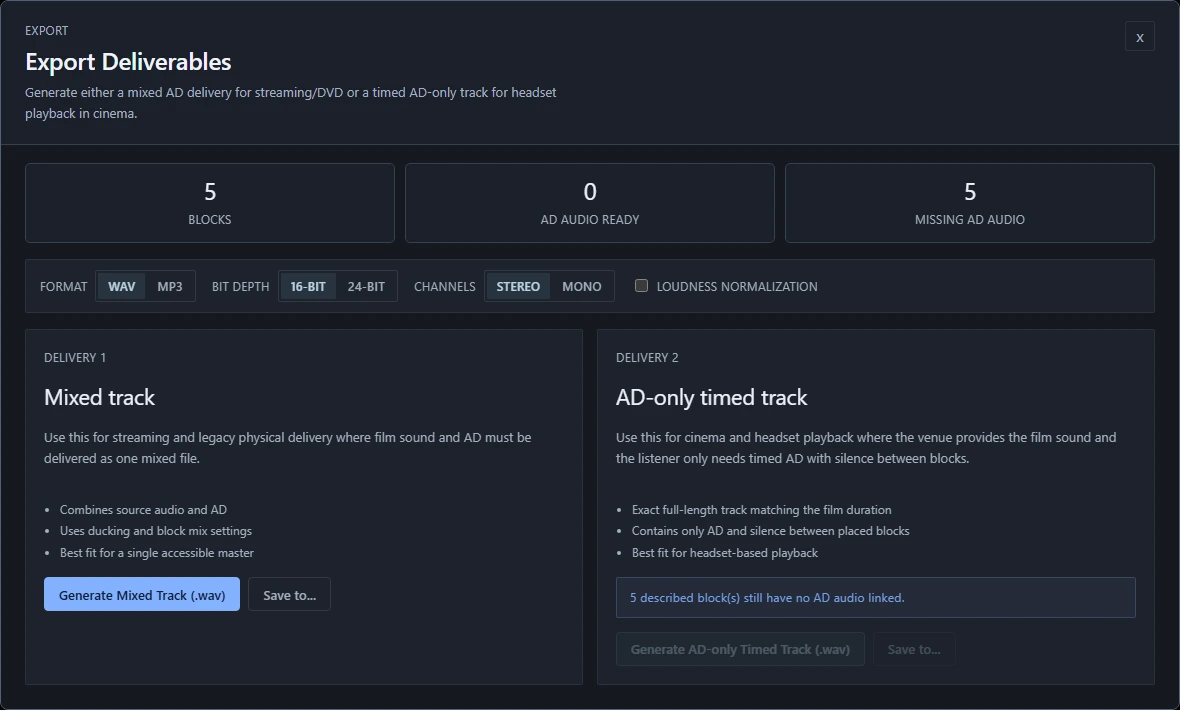
Two audio outputs.
Mixed track. Combines the film audio and description recordings, using your ducking and mix settings.
AD-only timed track. Keeps the narration at its positions across the film, with silence between cues. Use it when the next production stage needs description audio separately from the soundtrack.
Confirm which output your client or playback system needs before preparing the final files.
Choose the format.
Set the levels.
- WAV
- 16-bit or 24-bit PCM audio.
- MP3
- 320 kbps compressed audio.
- Channels
- Stereo or mono output.
- Loudness
- Optional loudness normalization with an adjustable LUFS target. The interface includes −23, −24 and −14 LUFS presets.
Hand over the script.
Export descriptions with their timing as SRT or WebVTT for interchange with other tools. Use Print script for a readable, timecoded manuscript.
These are script outputs. The mixed track and AD-only timed track are separate audio exports.
Review before export.
Use the review queue to find text that needs approval, missing audio, stale generated speech and timing issues. Coverage review can also flag moments that may need description.
Finish by listening through the film and narration together. Check word choice, pacing, transitions and whether important soundtrack details remain audible.
Guidance that fits
the assignment.
Narracue includes general, territory and streaming-oriented guidance profiles, with a custom option. Profiles guide checks such as reading speed, space between blocks, scene transitions and on-screen text.
Built-in profiles are starting points for editorial review. They are not certification from a broadcaster, platform or regulator, and do not automatically certify your exported audio.
Match the client’s
delivery brief.
Agree the specification with your client, then check the finished output against it:
- Required audio format, sample rate, bit depth and channel layout.
- Loudness and true-peak limits for the intended delivery.
- Track duration, synchronization and any required start offset.
- Script format, file naming and accompanying documentation.
A loudness preset is a target setting, not proof that a file meets every requirement. Verify the rendered audio and the final listening experience as part of your delivery review.
From the first cue to your final delivery.